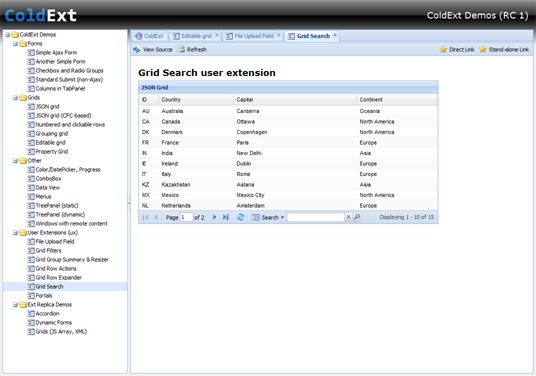
ColdExt Beta 2 (Preview)

Wow, what a hectic yet amazing couple of months. As some of you may know, I recently packed up all my stuff back home in Australia and put it into storage to embark on a working holiday around Europe and the UK for a year or more. So far, though, it has been all holiday and no work. It's kind of fun being homeless and unemployed :)

Progress on ColdExt has been a little bit slower than I had hoped, but it's going well just the same. I've been able to fit in some coding on lazy mornings in the Netherlands, on the trains through Italy, on cheap Ryanair flights (though it's difficult with a 15" notebook and no elbow room), and even managed to tinker with a few demos in between sessions at Scotch on the Rocks (what a superb conference - I want to attend again next year!).

So what has changed since my last blog post and the Beta 1 release? Well, quite a lot actually. I'm calling this the Beta 2 "Preview" release because the documentation and demos haven't been finished but the majority of the tag support is there.

  • Most ColdExt tags can now create stand-alone Ext components (where appropriate). This means that tags don't always have to be nested which makes reusing some components much easier. This is done with the "var" attribute, previously only supported on a small number of the tags.
  • All tags now support listeners (where appropriate) to allow for event handling.
  • All tags can now be nested inside any ColdFusion tags as appropriate for flow control.
  • All tags can now be used in templates included by <cfinclude>.
  • Ext JS 2.1 is now supported, and as a result the license has also changed to GPL. Basically this means that if you were to use Ext JS in a product that you want to distribute and you don't want to be bound by the terms of the GPL then you would need to purchase an Ext JS commercial license. As far as ColdExt is concerned, I would offer it under a "do whatever you like with it" license if I could :)
  • There is a new documentation and demos application in which the demos are hosted, though they can also run stand-alone. You can easily view the source code of the demos right on the page too.
  • The ColdExt Wiki is now hosted on my own site to allow others to sign up and contribute to it. Unfortunately on RIAForge I was the only one that could modify the pages :(
  • Plus many more small fixes that have been reported on the ColdExt Forums on RIAForge...

Download ColdExt Beta 2 "Preview" from RIAForge


coldext-beta-2-preview


I'd like to thank the people that have been using ColdExt, reporting issues and assisting with new ideas and tag implementations. I know I haven't got around to implementing all of them yet but rest assured they are on my Todo lists in Basecamp. I particularly want to get to some of the Ext JS User Extensions (such as Paged Row Numberer, Grid Filters and Radio Groups) before releasing Beta 2 "proper". Until then, have a look at the ColdExt Beta 2 "Preview" Demos to get a taste of Ext goodness :)

ColdExt Wiki and Getting Started Tutorial

Having a bunch of custom tags and an XML dictionary for CFEclipse is one thing, but knowing how to use them is another! So last night I began working on every developer's favourite task... documentation :P

The ColdExt Wiki is now enabled on RIAForge and I have started out with baby steps by writing a Getting Started Tutorial which covers the absolute basic requirements of getting up and running with ColdExt.

I have a number of pages and tutorials planned for the wiki (some of which I have already made notes of on the wiki home page) and will get around to adding them as soon as I can. If anyone would like to help out with documentation (rofl!) or start a discussion about what documentation is needed the ColdExt Forums could be a good place to do it. I am open to suggestions!

The next release of ColdExt will very much be about better documentation and demos, in addition to more tags and enhancements of course :)


P.S. Does anybody know if it's possible to turn off WikiTerms on RIAForge? At the least I think a special token like __NOTERMS__ would be very useful.

ColdExt Beta 1 with CFEclipse tag insight!

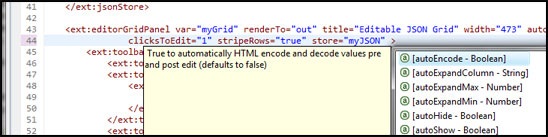
I'm fairly excited about this release because it has some really cool stuff in it :) I've already dropped the biggest bombshell in the blog post title, which is support for tag insight in CFEclipse - very nice!, but there are a bunch of other nice updates and new features as well...

Changes at a glance include;

  • 7 new tags, 3 new grid demos
  • 90%+ of the tags have been updated with inline documentation
  • EditorGridPanel provides support for editable grids (only supports input and comboBox fields at this time, more to come very soon)
  • GroupingStore and GroupingView can now be used for grouping in both GridPanel and EditorGridPanel
  • GridRowNumberer can be used as a numbered column in Grids (though it doesn't support paged grids - by design from the Ext Team)
  • New <ext:html> tag for including arbitrary chunks of HTML inside panels and forms
  • Tags which don't require a closing tag will now work as a single tag without a trailing slash (partial support)
  • Tags which require a closing tag will throw an error if the closing tag is missing (partial support)
  • Initial implementation of attribute validation in some tags (starting with the panel tags to assist with rendering issues)
  • Support for including the Ext debugging JS
  • The bundled version of CFJSON has been updated to the latest v1.9
  • CFEclipse tag insight (/dictionary/coldext.xml)


Download ColdExt Beta 1 from RIAForge

Here are the new online demos:


I will refrain from posting screenshots and code listings of the demos this time round since you can download everything you need and view the working demos above (well, that and it's getting late here in Oz and I need some sleep!) :)

One thing you need to know though is how to set up the coldext.xml file to work in CFEclipse. Just browse to the "plugins\org.cfeclipse.cfml_1.3.1.5\dictionary" directory inside CFEclipse (your CFEclipse plugin version number may vary) and insert a copy of the ColdExt "dictionary\coldext.xml" file. Then in the same location, make a backup of the "dictionaryconfig.xml" (just in case) and then open it to make the following modification, inserting a single line to include the coldext.xml file:

<version key="cf8" label="Coldfusion 8">
    <grammar location="cf8.xml" />
    <grammar location="user.xml" />
   
<grammar location="coldext.xml" />
</version>

Give CFEclipse a restart and you should now be swinging with ColdExt tag insight!

coldext-tag-insight

*Note that at this stage only the attributes for about 90% of the tags are documented, I haven't gotten around to inline help for the actual tags themselves just yet...


If you have any feedback about this release feel free to post here in the comments or make use of the features on RIAForge:

All feedback, bug submissions, feature requests and comments are much appreciated :)

ColdExt Alpha 3 with GridPanel support

With support for forms, layouts, menus, remote data, trees and various other bits and pieces, the icing on the cake is definitely support for GridPanels... So without further ado, I present ColdExt Alpha 3:

Download ColdExt Alpha 3 from RIAForge

There are no less than 10 new tags including asyncTreeNode, field (used with Stores), gridColumn, gridPanel, pagingToolbar, simpleStore, store, toolbarSplitButton, treeLoader, and xmlReader. A few tags have also been updated to provide support for Ext themes and greater functionality for data stores.

This will probably be the last release that I brand as an Alpha, as the releases over the last 5-6 weeks have really just been about seeing what kind of coverage I can get on all the main UI elements you would want or need to build an app. Looking towards the next release I think ColdExt will be in good enough shape to provide examples of small-scale but real world applications. We'll see how things go I guess!

Between this release and last I've put ColdExt into SVN on RIAForge and have usually been committing new stuff every few days. At the moment everything is going into the trunk so feel free to check there for updates if you are keen :)

Now for the demos...

First up is an example of using the treeLoader with an asyncTreeNode to load a tree remotely using JSON. This one was posted in the comments of my last ColdExt entry as I wrote it a couple of days after the release, but I'm including it here as well for those that missed it:

The following is example code for a tree that uses remote loading:

<ext:init />
<ext:onReady>
    <ext:treePanel var="myTree2" title="TreePanel TreeLoader" rootVisible="false" width="250" renderTo="out">
        <ext:treeLoader url="treedata.cfm" />
        <ext:rootNode text="Root Node" />
    </ext:treePanel>
</ext:onReady>


Next are the 2 new grid demos. The first demo contains two replicas of the samples that come with Ext 2.0, which feature a grid using an array of data with a simple store plus examples of custom renderers (not the currency formatting and coloured values in the columns), and a grid which loads its data remotely from an XML file:

The second grid demo is a custom one that I have created. It shows off a couple of neat features such as the pagingToolbar and the use of a jsonStore with remote paging and sorting (use FireBug to watch the Ajax requests as you interact with the demo!):

Here's a screenshot of the grid in action:
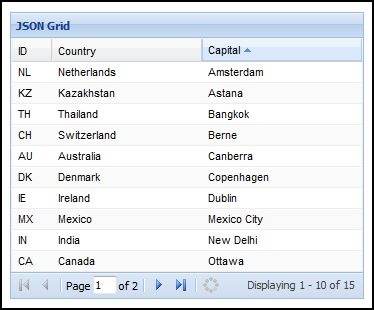
JSON Grid with remote paging and sorting

The following is example code used for the JSON grid with remote paging and sorting:

<ext:init />
<ext:onReady>
    <ext:jsonStore var="myJSON" autoLoad="true" remoteSort="true"
            root="query.data" totalProperty="totalcount" url="data2.cfm">
        <ext:field name="id" />
        <ext:field name="country" />
        <ext:field name="capital" />
        <ext:param name="limit" value="10" />
    </ext:jsonStore>
    <ext:gridPanel renderTo="out" title="JSON Grid" width="354" height="287" stripeRows="true" store="myJSON">
        <ext:gridColumn header="ID" width="40" sortable="true" dataIndex="id" />
        <ext:gridColumn header="Country" width="150" sortable="true" dataIndex="country" />
        <ext:gridColumn header="Capital" width="160" sortable="true" dataIndex="capital" />
        <ext:pagingToolbar displayInfo="true" pageSize="10" store="myJSON" />
    </ext:gridPanel>
</ext:onReady>
 

It's also worth mentioning that this demo makes use of CFJSON, which is great because it means ColdExt and its demos work fine on both CFMX7 and CF8. (Incidentally CFJSON was updated a couple of weeks ago but I haven't grabbed the latest version of it just yet. It will be in the next release though).

As usual, if you have any questions, comments or feature requests I'd love to hear them.
ColdExt Alpha 2 release

This release almost took me a couple of weeks to get out the door, and with 5 new tags and 13 updated/improved tags ColdExt is getting that little bit closer to being usable in the real world.

New tags include support for components such as accordions, tools with onclick handlers, tooltips, and xtemplates. The updated tags include better support for container layouts, tabs and treePanels. And there are 2 new demos to check out as well :) As usual, just extract the folders to your webroot to get up and running quickly.

Download ColdExt Alpha 2 from RIAForge

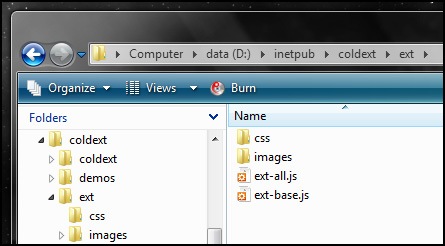
In this release the Ext files are no longer bundled so you will need to head over to the Ext JS Download page, grab the Ext 2.0.1 release and extract it to a temporary directory. Then in your webroot, where you have already placed the "coldext" and "demos" folders from the ColdExt Alpha 2 release, create a new folder called "ext". As per the image below, into the new "ext" folder you just need to place a copy of "ext-all.js" (from the "ext-2.0.1" folder) and "ext-base.js" (from the "ext-2.0.1\adapter\ext" folder), and both the "css" and "images" folders (from the "ext-2.0.1\resources" folder), then you should be right to go.

ColdExt folder structure

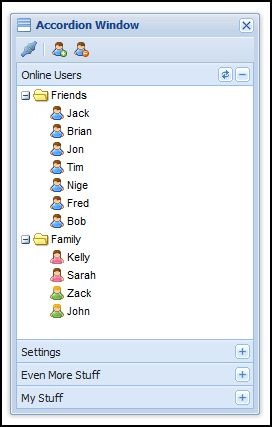
The first new demo is the ColdExt Accordion demo which is a replica of the Accordion Window that is in the Ext Desktop demo (minus the minimize/maximize functionality).

Here is a screenshot of the accordion demo as it is rendered:

coldext-accordion1 

And below is the main chunk of ColdExt code used to construct the accordion demo:

<ext:init />
<ext:onReady> 

    <ext:createChild renderTo="out" tag="h1">ColdExt Example Accordion (Ext Replica)</ext:createChild> 

    <ext:window var="myWindow" title="Accordion Window" layout="accordion" iconCls="icon-accordion"
                width="250" height="400" border="false" resizable="true" show="true">
        <ext:toolbar>
            <ext:toolbarButton icon="icons/fam/connect.gif">
                <ext:tooltip title="Rich Tooltips" text="Let your users know what they can do!" />
            </ext:toolbarButton>
            <ext:separator />
            <ext:toolbarButton icon="icons/fam/user_add.gif" tooltip="Add a new user" />
            <ext:toolbarButton icon="icons/fam/user_delete.gif" tooltip="Remove the selected user" />
        </ext:toolbar>
        <ext:treePanel id="myTree" title="Online Users" lines="false" rootVisible="false" margin="0 0 5 0">
            <ext:tool id="refresh">
                <ext:onclick>
                    var tree = Ext.getCmp('myTree');
                    tree.body.mask('Loading', 'x-mask-loading');
                    tree.root.reload();
                    tree.root.collapse(true, false);
                    setTimeout(function(){
                        tree.body.unmask();
                        tree.root.expand(true, true);
                    }, 1000);
                </ext:onclick>
            </ext:tool>
            <ext:rootNode>
                <ext:treeNode text="Friends" expanded="true">
                    <ext:treeNode text="Jack" iconCls="user" />
                    <ext:treeNode text="Brian" iconCls="user" />
                    <ext:treeNode text="Jon" iconCls="user" />
                    <ext:treeNode text="Tim" iconCls="user" />
                    <ext:treeNode text="Nige" iconCls="user" />
                    <ext:treeNode text="Fred" iconCls="user" />
                    <ext:treeNode text="Bob" iconCls="user" />
                </ext:treeNode>
                <ext:treeNode text="Family" expanded="true">
                    <ext:treeNode text="Kelly" iconCls="female" />
                    <ext:treeNode text="Sarah" iconCls="female" />
                    <ext:treeNode text="Zack" iconCls="green" />
                    <ext:treeNode text="John" iconCls="green" />
                </ext:treeNode>
            </ext:rootNode>
        </ext:treePanel>
        <ext:panel title="Settings">
            Something useful would be in here.
        </ext:panel>
        <ext:panel title="Even More Stuff">
            Something useful would be in here.
        </ext:panel>
        <ext:panel title="My Stuff">
            Something useful would be in here.
        </ext:panel>
    </ext:window> 

</ext:onReady>
 

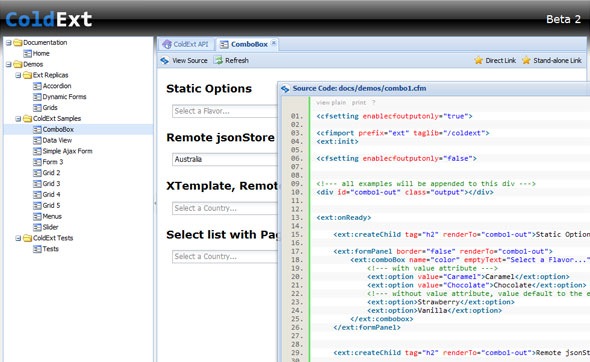
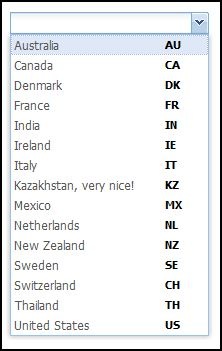
Next up is the ColdExt Combobox demo which makes use of the XTemplate templating features that Ext provides. Templates are mostly used with the DataView component which the Combobox uses internally for rendering its list of items (note that I haven't yet implemented DataViews directly in ColdExt, they will be coming in the next release!). Not only can templates display simple data values but they can do logic, simple calculations and even implement member functions for more complex actions, as per the example below.

Here is a screenshot of the Combobox and XTemplate in action, rendering some data side-by-side in a list:

coldext-combobox-template1

And below is the code used to produce the Combobox. Take special note of the XTemplate tag and the nested member function that is used in the template, it's a super powerful feature IMO.

<ext:init />
<ext:onReady>

	<ext:createChild renderTo="out" tag="h1">ColdExt Custom Example Combobox</ext:createChild>

	<!--- coldext custom example - combobox --->
	<ext:createChild renderTo="out" tag="h2">Combobox 1 - XTemplate Example</ext:createChild>

	<ext:jsonStore var="myJSON" url="data.cfm">
		<ext:storeField name="id" />
		<ext:storeField name="country" />
	</ext:jsonStore>

	<ext:formPanel border="false" renderTo="out">
		<ext:comboBox name="country" emptyText="Select a Country..." hideLabel="true"
				displayField="country" valueField="id" store="myJSON">
			<ext:xtemplate>
				<tpl for="."><div class="x-combo-list-item">
					<span class="country">{country}<tpl if="this.isCode('KZ', id)">, very nice!</tpl></span>
					<span class="code">{id}</span>
				</div></tpl>
				<ext:script>
					isCode: function(a, b){
						return a == b;
					}
				</ext:script>
			</ext:xtemplate>
		</ext:combobox>
	</ext:formPanel>

</ext:onReady>
 

Anyway, that's about it for this release. If you have any questions, comments, feedback or feature requests please feel free to drop me a note in the comments.

ColdExt Alpha 1b

I've made a few updates to ColdExt during the week which I thought I would share now, since I'll be away for the weekend (a friends buck's weekend with some Paintball Skirmish action - and plenty of drinking no doubt!).

Some new tags include basic support for menus, trees, viewports and other various enhancements. Here are a few new live demos:

You can download ColdExt Alpha 1b from RIAForge.

From the next release onwards the Ext JS files will no longer be bundled so you will need to download them separately and drop them into your project.

ColdExt goals and future roadmap

I have a few clear goals that I am trying to achieve with ColdExt which will hopefully give you an idea of where I am coming from and where I am heading with development.

First of all, I want you to be able to drop ColdExt into a project without any hassles and without any configuration beyond an Application Name (although a small amount of configuration may be unavoidable for an existing Ext project).

Second, I want the ColdExt API to match the Ext API as closely as possible so that the Ext documentation is entirely relevant to using the ColdExt tags. I also want to retain the power and flexibility of Ext in it's entirety, not have ColdExt force you down some specific path for how your UI must be declared and rendered. For example many component tags should be able to be used stand-alone to simply create JavaScript objects that can be used (and reused) later on in the code; components shouldn't always have to be rendered immediately. (Note that this hasn't yet been achieved in the Alpha 1 release, everything is constructed by config objects at the moment).

Third, I want to provide some default configuration options that will set up the UI controls with consistent display properties Application-wide and allow you to customise these global defaults with your own values if you wish. This can just help to keep to keep your code a bit cleaner by letting you write less and repeat yourself less :) Of course, any global defaults can be overridden at the tag level.

The ultimate goal is to achieve near complete coverage of all Ext features and functionality, so that you don't have to drop back to pure JS to use the more complex or obscure features that Ext has to offer. The ColdExt tags should be useful for the vast majority of cases, and then for any hardcore client-side programming ColdExt can still wrap handlers, listeners and any other pieces of JavaScript.

For the road ahead I also have a few ideas that could make development with ColdExt quite interesting;

  • Built-in handlers for common client-side actions/events
  • Support for ColdFusion Structs/Queries/JSON/XML/Objects(?) when applying values to FormPanel fields (and other types of forms)
  • Form generation/scaffolding of some description (tags make this so much easier, it would be a PITA to do this directly with JS!)
  • Code assistance in CFEclipse

Anyway, if you have any comments or opinions on the direction I'm taking I would like to hear them :)

ColdExt first alpha release on RIAForge

Well, I've finally got the ColdExt code into a clean enough and complete enough state to release something that is useful enough to be played with :) There are a number of things this release doesn't do, but it does handle form functionality well enough that you can use it to build reasonably rich forms, validate the input and POST form data back to the server. Just a taste of things to come I guess!

Download ColdExt Alpha 1 from RIAForge

ColdExt comes bundled with the latest Ext 2.0.1 release so you don't need to download it separately. Basically you can just drop the "coldext" and "ext" folders into your web root, set your Application Name in an application.cfc/cfm and start playing with it immediately.

At this stage the examples are very light (check the /demos folder), but if you are familiar with Ext or don't mind browsing the Ext documentation and the Ext examples then I'm sure you will pick things up in no time (there are LOTS of attributes that can be used with each tag if you want to/need to).

I also have a couple of live demos up here:

Keep your eyes peeled for more ColdExt related posts to follow shortly...

BlogCFC was created by Raymond Camden. This blog is running version 5.6.001.