ColdExt Beta 1 with CFEclipse tag insight!

I'm fairly excited about this release because it has some really cool stuff in it :) I've already dropped the biggest bombshell in the blog post title, which is support for tag insight in CFEclipse - very nice!, but there are a bunch of other nice updates and new features as well...

Changes at a glance include;

  • 7 new tags, 3 new grid demos
  • 90%+ of the tags have been updated with inline documentation
  • EditorGridPanel provides support for editable grids (only supports input and comboBox fields at this time, more to come very soon)
  • GroupingStore and GroupingView can now be used for grouping in both GridPanel and EditorGridPanel
  • GridRowNumberer can be used as a numbered column in Grids (though it doesn't support paged grids - by design from the Ext Team)
  • New <ext:html> tag for including arbitrary chunks of HTML inside panels and forms
  • Tags which don't require a closing tag will now work as a single tag without a trailing slash (partial support)
  • Tags which require a closing tag will throw an error if the closing tag is missing (partial support)
  • Initial implementation of attribute validation in some tags (starting with the panel tags to assist with rendering issues)
  • Support for including the Ext debugging JS
  • The bundled version of CFJSON has been updated to the latest v1.9
  • CFEclipse tag insight (/dictionary/coldext.xml)


Download ColdExt Beta 1 from RIAForge

Here are the new online demos:


I will refrain from posting screenshots and code listings of the demos this time round since you can download everything you need and view the working demos above (well, that and it's getting late here in Oz and I need some sleep!) :)

One thing you need to know though is how to set up the coldext.xml file to work in CFEclipse. Just browse to the "plugins\org.cfeclipse.cfml_1.3.1.5\dictionary" directory inside CFEclipse (your CFEclipse plugin version number may vary) and insert a copy of the ColdExt "dictionary\coldext.xml" file. Then in the same location, make a backup of the "dictionaryconfig.xml" (just in case) and then open it to make the following modification, inserting a single line to include the coldext.xml file:

<version key="cf8" label="Coldfusion 8">
    <grammar location="cf8.xml" />
    <grammar location="user.xml" />
   
<grammar location="coldext.xml" />
</version>

Give CFEclipse a restart and you should now be swinging with ColdExt tag insight!
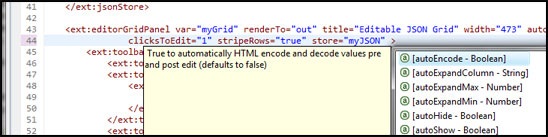
coldext-tag-insight

*Note that at this stage only the attributes for about 90% of the tags are documented, I haven't gotten around to inline help for the actual tags themselves just yet...


If you have any feedback about this release feel free to post here in the comments or make use of the features on RIAForge:

All feedback, bug submissions, feature requests and comments are much appreciated :)

Comments
nice dude! i have a question for you: for generating your eclipse dictionary file, did you create a generic dictionary maker? I've been thinking of creating a dictionary maker for mxunit for a while now but what I'd really like to do is make one that could generate dictionary files for all kinds of stuff.

obviously, creating one of these by hand is way too much work! yours looks particularly detailed, though. very well done.
# Posted By marc esher | 3/17/08 8:20 AM
Very cool! I'll be adding some kind of page on the CFEclipse wiki to keep track of all these CFEclipse extensions.
# Posted By Jim Priest | 3/17/08 8:35 AM
Download button is missing in RiaForge.
# Posted By xavier | 3/17/08 2:36 PM
Oops, looks like you can't delete the old zip and upload a new zip in the one go on RIAForge :P The download button is there now, sorry! (Thanks for letting me know xavier).

@marc: For generating the dictionary I used the same syntax (mostly) that the guys at Daemon use for generating their FarCry dictionary (see this blog post: http://blog.daemon.com.au/go/blog-post/cfeclipse-d... and also this wiki page: http://docs.farcrycms.org/display/FCCORE/Auto-Docu...). I just wrote my own little parser which deals with a single folder of custom tags (it's not designed to work with function libraries, CFC's or other code) and it seems to work quite well.

The parser that Daemon have is much more fully featured but they aren't releasing it yet AFAIK (maybe Geoff would care to comment if he sees this?). I know Geoff would like to settle on a standard way of writing inline comments that can be used for documentation generation, which would be a very good thing.

@Jim: Good idea about the wiki page, that sounds great. BTW After working with the xml dictionaries / code insight stuff I have some feedback for Mark (oh no, more work?! hehe) :)
# Posted By Justin Carter | 3/17/08 3:33 PM
Justin
Really impressive work. By the way I tried forms1.cfm demo, it does not work. clicking on submit button! nothing happen, (added url="index").

If you got time please have a look to forms1.cfm demo.

thanks
# Posted By Sana | 3/18/08 3:58 PM
@Sana: The forms1.cfm demo is a replica of the dynamic form demos that come with Ext. They are purely presentational and don't actually have any form submission / backend stuff hooked in, which is why nothing happens when you click the save button :) For a working forms example take a look at the forms2.cfm demo. I will try to concentrate on better demos and documentation for the next release to make things a bit clearer.
# Posted By Justin Carter | 3/19/08 12:35 AM
Hi justin,

Thanks for releasing your ext tag library! The support for earlier versions of CF is a huge plus.

Great Job!
# Posted By Gary Gilbert | 3/19/08 8:48 AM
Justin,
Again, nice work on this, it's really opened the floodgates for me to begin working with Ext.
One thing that I'd really like to see is an example populating a form from a database (accessed through ColdFusion), then submitting the changes back to the ColdFusion back-end. Sort of in the way you did the grid5.cfm demo, but with a form instead of the editable grid. I'm just not sure how to populate the form data using Ext's events...
# Posted By Andy Lynch | 3/20/08 8:18 AM
@Andy: If you want to insert the values into the form on the server-side you can use the value attribute on your form fields.

<ext:numberField name="age" value="#user.getAge()#">

Also in grid3.cfm you can see a small example of setting form field values using JS.

For a full Ajax solution I'll build another demo and let you know when it's available :)
# Posted By Justin Carter | 3/20/08 4:49 PM
Justin,

I did stumble onto the grid3.cfm example, and I like the way it works. I'm looking at modifying grid3.cfm to accept saves from the form, using the data for grid5.cfm (with that nifty application saved querySim). If I can get it to work, I'll send it up to you, in case you want to use it, or in case I made a big blunder that needs to be corrected. :-)

I did realize that I could set it on server side as you indicated, but I'm not sure how to do it from the client side within Ext.

-Andy
# Posted By Andy Lynch | 3/21/08 8:01 AM


If you subscribe, any new posts to this thread will be sent to your email address.

BlogCFC was created by Raymond Camden. This blog is running version 5.6.001.