ColdExt Alpha 3 with GridPanel support

With support for forms, layouts, menus, remote data, trees and various other bits and pieces, the icing on the cake is definitely support for GridPanels... So without further ado, I present ColdExt Alpha 3:

Download ColdExt Alpha 3 from RIAForge

There are no less than 10 new tags including asyncTreeNode, field (used with Stores), gridColumn, gridPanel, pagingToolbar, simpleStore, store, toolbarSplitButton, treeLoader, and xmlReader. A few tags have also been updated to provide support for Ext themes and greater functionality for data stores.

This will probably be the last release that I brand as an Alpha, as the releases over the last 5-6 weeks have really just been about seeing what kind of coverage I can get on all the main UI elements you would want or need to build an app. Looking towards the next release I think ColdExt will be in good enough shape to provide examples of small-scale but real world applications. We'll see how things go I guess!

Between this release and last I've put ColdExt into SVN on RIAForge and have usually been committing new stuff every few days. At the moment everything is going into the trunk so feel free to check there for updates if you are keen :)

Now for the demos...

First up is an example of using the treeLoader with an asyncTreeNode to load a tree remotely using JSON. This one was posted in the comments of my last ColdExt entry as I wrote it a couple of days after the release, but I'm including it here as well for those that missed it:

The following is example code for a tree that uses remote loading:

<ext:init />
<ext:onReady>
    <ext:treePanel var="myTree2" title="TreePanel TreeLoader" rootVisible="false" width="250" renderTo="out">
        <ext:treeLoader url="treedata.cfm" />
        <ext:rootNode text="Root Node" />
    </ext:treePanel>
</ext:onReady>


Next are the 2 new grid demos. The first demo contains two replicas of the samples that come with Ext 2.0, which feature a grid using an array of data with a simple store plus examples of custom renderers (not the currency formatting and coloured values in the columns), and a grid which loads its data remotely from an XML file:

The second grid demo is a custom one that I have created. It shows off a couple of neat features such as the pagingToolbar and the use of a jsonStore with remote paging and sorting (use FireBug to watch the Ajax requests as you interact with the demo!):

Here's a screenshot of the grid in action:
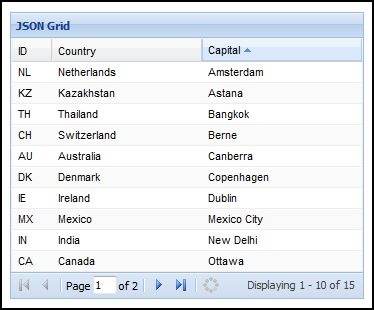
JSON Grid with remote paging and sorting

The following is example code used for the JSON grid with remote paging and sorting:

<ext:init />
<ext:onReady>
    <ext:jsonStore var="myJSON" autoLoad="true" remoteSort="true"
            root="query.data" totalProperty="totalcount" url="data2.cfm">
        <ext:field name="id" />
        <ext:field name="country" />
        <ext:field name="capital" />
        <ext:param name="limit" value="10" />
    </ext:jsonStore>
    <ext:gridPanel renderTo="out" title="JSON Grid" width="354" height="287" stripeRows="true" store="myJSON">
        <ext:gridColumn header="ID" width="40" sortable="true" dataIndex="id" />
        <ext:gridColumn header="Country" width="150" sortable="true" dataIndex="country" />
        <ext:gridColumn header="Capital" width="160" sortable="true" dataIndex="capital" />
        <ext:pagingToolbar displayInfo="true" pageSize="10" store="myJSON" />
    </ext:gridPanel>
</ext:onReady>
 

It's also worth mentioning that this demo makes use of CFJSON, which is great because it means ColdExt and its demos work fine on both CFMX7 and CF8. (Incidentally CFJSON was updated a couple of weeks ago but I haven't grabbed the latest version of it just yet. It will be in the next release though).

As usual, if you have any questions, comments or feature requests I'd love to hear them.

Comments (Comment Moderation is enabled. Your comment will not appear until approved.)
Wow, that's great man!!!
# Posted By Shimon | 3/6/08 12:33 PM
Wow, that's great man!!!
# Posted By Shimon | 3/6/08 12:33 PM
Nice work. I was able to modify your grid2 example to work with my own data in a suprisingly short time. Keep up the good work.

I'll be watching this project closely, as I'm sure many others are.
# Posted By Andy Lynch | 3/7/08 8:54 AM
Cool, thats really good to hear Andy :)
# Posted By Justin Carter | 3/7/08 3:48 PM
Justin,
I'm still working on my project using your code and I made a little change to your param.cfm file. In the interest of "supporting" your project, I figured I'd post it up here, because I couldn't see another contact link on your site.
Added this line after your existing cfparams:
<cfparam name="attributes.js" default="">
Then changed your cfsavecontent to have this body:
<cfif Attributes.js EQ "">
<cfoutput>#attributes.name#: "#attributes.value#"</cfoutput>
<cfelse>
<cfoutput>#attributes.name#: #attributes.js#</cfoutput>
</cfif>

This allows me to pass in a piece of javascript (like a variable) instead of a literal as a parameter to a jsonStore (at least as I'm using it).

Use it, or ignore it, as you wish. If there's a better way to do it, please enlighten me.
-Andy
# Posted By Andy Lynch | 3/11/08 8:45 AM
@Andy: I'll send you an email shortly ;)
# Posted By Justin Carter | 3/11/08 5:32 PM
Excellent work Justin! Hopefully I'll have a real world application I might be able to share. That is, if time allows me to get it completed.
# Posted By Rafael Quinones | 3/11/08 7:21 PM
getting this error:
Unknown tag: ext:init
# Posted By Rick | 3/26/08 1:23 PM
@Rick: I'm guessing that's because the library hasn't been imported or is using a different tag prefix. The sample code above just shows the ColdExt tags in use, but there are another couple of lines of CFML and some HTML that also needs to go with it. You can look at the sample code in the /demos folder of the release for a better idea of how things work.

I also started on a Getting Started wiki page last night, which you might find useful for understanding the very basics (though it's only half complete so far):

http://coldext.riaforge.org/wiki/index.cfm/Getting...

Let me know if you get stuck and I can help further :)
# Posted By Justin Carter | 3/26/08 6:53 PM
After seeing the wiki, it worked!

The demos are super - You're truly a bad mamajama!
# Posted By Rick | 3/26/08 11:04 PM
@Justin: While I continue my research into ColdExt and Ext JS, I am now trying to figure out the best way to increase the efficiency and speed with which the JSON data is returned to the gridPanel. Some have suggested using a JSON reader. The question I would like to pose to you and anyone else who'd be interested in posting a reply, is what is the recommend way of accomplishing this. Also would like to know of any examples where the "jsonReader" has been implemented.
# Posted By Calvert | 4/15/08 6:58 PM
@Calvert: In /demos/grid4.cfm you can see an example of using the jsonReader with a groupingStore. It can be used in the exact same way with the plain old vanilla <ext:store> stag if you wish, however the jsonStore is easier to use and work with because it accepts some of the attributes of the jsonReader directly. I don't think that there would be much of an advantage using a jsonReader+store over a jsonStore, but I'd be interested to know what you find out :)
# Posted By Justin Carter | 4/16/08 9:26 PM
Do you have any experience or knowledge of using the jsonReader with a remote call to a CFC via CF 8 and returnFormat=json and queryFormat=column passed as url variables -- i.e. "URL: myCFC.cfc?method=myfunction&returnFormat=json&queryFormat=column"
# Posted By Calvert | 5/5/08 10:02 PM


If you subscribe, any new posts to this thread will be sent to your email address.