ColdExt Alpha 2 release

This release almost took me a couple of weeks to get out the door, and with 5 new tags and 13 updated/improved tags ColdExt is getting that little bit closer to being usable in the real world.

New tags include support for components such as accordions, tools with onclick handlers, tooltips, and xtemplates. The updated tags include better support for container layouts, tabs and treePanels. And there are 2 new demos to check out as well :) As usual, just extract the folders to your webroot to get up and running quickly.

Download ColdExt Alpha 2 from RIAForge

In this release the Ext files are no longer bundled so you will need to head over to the Ext JS Download page, grab the Ext 2.0.1 release and extract it to a temporary directory. Then in your webroot, where you have already placed the "coldext" and "demos" folders from the ColdExt Alpha 2 release, create a new folder called "ext". As per the image below, into the new "ext" folder you just need to place a copy of "ext-all.js" (from the "ext-2.0.1" folder) and "ext-base.js" (from the "ext-2.0.1\adapter\ext" folder), and both the "css" and "images" folders (from the "ext-2.0.1\resources" folder), then you should be right to go.
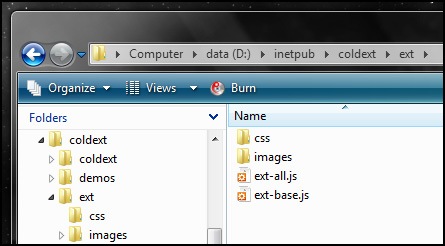
ColdExt folder structure

The first new demo is the ColdExt Accordion demo which is a replica of the Accordion Window that is in the Ext Desktop demo (minus the minimize/maximize functionality).

Here is a screenshot of the accordion demo as it is rendered:
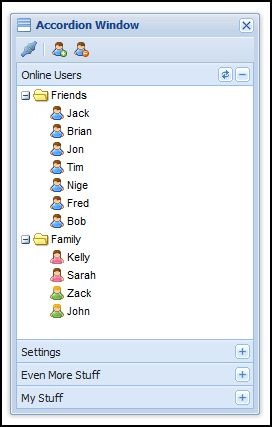
coldext-accordion1 

And below is the main chunk of ColdExt code used to construct the accordion demo:

<ext:init />
<ext:onReady> 

    <ext:createChild renderTo="out" tag="h1">ColdExt Example Accordion (Ext Replica)</ext:createChild> 

    <ext:window var="myWindow" title="Accordion Window" layout="accordion" iconCls="icon-accordion"
                width="250" height="400" border="false" resizable="true" show="true">
        <ext:toolbar>
            <ext:toolbarButton icon="icons/fam/connect.gif">
                <ext:tooltip title="Rich Tooltips" text="Let your users know what they can do!" />
            </ext:toolbarButton>
            <ext:separator />
            <ext:toolbarButton icon="icons/fam/user_add.gif" tooltip="Add a new user" />
            <ext:toolbarButton icon="icons/fam/user_delete.gif" tooltip="Remove the selected user" />
        </ext:toolbar>
        <ext:treePanel id="myTree" title="Online Users" lines="false" rootVisible="false" margin="0 0 5 0">
            <ext:tool id="refresh">
                <ext:onclick>
                    var tree = Ext.getCmp('myTree');
                    tree.body.mask('Loading', 'x-mask-loading');
                    tree.root.reload();
                    tree.root.collapse(true, false);
                    setTimeout(function(){
                        tree.body.unmask();
                        tree.root.expand(true, true);
                    }, 1000);
                </ext:onclick>
            </ext:tool>
            <ext:rootNode>
                <ext:treeNode text="Friends" expanded="true">
                    <ext:treeNode text="Jack" iconCls="user" />
                    <ext:treeNode text="Brian" iconCls="user" />
                    <ext:treeNode text="Jon" iconCls="user" />
                    <ext:treeNode text="Tim" iconCls="user" />
                    <ext:treeNode text="Nige" iconCls="user" />
                    <ext:treeNode text="Fred" iconCls="user" />
                    <ext:treeNode text="Bob" iconCls="user" />
                </ext:treeNode>
                <ext:treeNode text="Family" expanded="true">
                    <ext:treeNode text="Kelly" iconCls="female" />
                    <ext:treeNode text="Sarah" iconCls="female" />
                    <ext:treeNode text="Zack" iconCls="green" />
                    <ext:treeNode text="John" iconCls="green" />
                </ext:treeNode>
            </ext:rootNode>
        </ext:treePanel>
        <ext:panel title="Settings">
            Something useful would be in here.
        </ext:panel>
        <ext:panel title="Even More Stuff">
            Something useful would be in here.
        </ext:panel>
        <ext:panel title="My Stuff">
            Something useful would be in here.
        </ext:panel>
    </ext:window> 

</ext:onReady>
 

Next up is the ColdExt Combobox demo which makes use of the XTemplate templating features that Ext provides. Templates are mostly used with the DataView component which the Combobox uses internally for rendering its list of items (note that I haven't yet implemented DataViews directly in ColdExt, they will be coming in the next release!). Not only can templates display simple data values but they can do logic, simple calculations and even implement member functions for more complex actions, as per the example below.

Here is a screenshot of the Combobox and XTemplate in action, rendering some data side-by-side in a list:
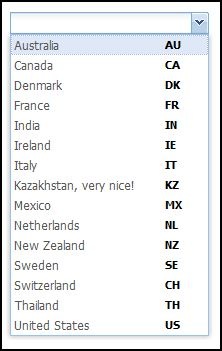
coldext-combobox-template1

And below is the code used to produce the Combobox. Take special note of the XTemplate tag and the nested member function that is used in the template, it's a super powerful feature IMO.

<ext:init />
<ext:onReady>

	<ext:createChild renderTo="out" tag="h1">ColdExt Custom Example Combobox</ext:createChild>

	<!--- coldext custom example - combobox --->
	<ext:createChild renderTo="out" tag="h2">Combobox 1 - XTemplate Example</ext:createChild>

	<ext:jsonStore var="myJSON" url="data.cfm">
		<ext:storeField name="id" />
		<ext:storeField name="country" />
	</ext:jsonStore>

	<ext:formPanel border="false" renderTo="out">
		<ext:comboBox name="country" emptyText="Select a Country..." hideLabel="true"
				displayField="country" valueField="id" store="myJSON">
			<ext:xtemplate>
				<tpl for="."><div class="x-combo-list-item">
					<span class="country">{country}<tpl if="this.isCode('KZ', id)">, very nice!</tpl></span>
					<span class="code">{id}</span>
				</div></tpl>
				<ext:script>
					isCode: function(a, b){
						return a == b;
					}
				</ext:script>
			</ext:xtemplate>
		</ext:combobox>
	</ext:formPanel>

</ext:onReady>
 

Anyway, that's about it for this release. If you have any questions, comments, feedback or feature requests please feel free to drop me a note in the comments.

Comments (Comment Moderation is enabled. Your comment will not appear until approved.)
Lookin good. :-)

Is there a way to populate that tree object dynamically?
# Posted By Dan Sorensen | 2/21/08 11:03 AM
Not just yet, I need to implement the asyncTreeNode tag. Definitely in the next release though :) Shouldn't be very far away at all.
# Posted By Justin Carter | 2/21/08 2:37 PM
Justin very impressive work... I have a one suggestion that rather downloading zip file for every time updates. Could you add code into riaforge svn, so svn-checkout changes easily.

many thanks
# Posted By Sana | 2/21/08 2:48 PM
@Sana, sure I'll start using SVN as soon as I have more updates to make, I'm just working on a new notebook at the moment and haven't installed an SVN client yet :P hehe...
# Posted By Justin Carter | 2/21/08 10:56 PM
Nice work. Just getting started with Ext, so I'm watching your project closely.

For some reason, I am having a real hard time grasping the interaction between ColdFusion and Ext. Being a novice at Ext, browsing the API documentation, although it is very complete, there is so much that I can't seem to pull out the important bits that I need to populate a form from a database, post changes to the database, etc.
Anyhow, I shall plod on. Keep up the good work.
# Posted By Andy Lynch | 2/22/08 9:06 AM
Never mind, I see you included some examples. After looking into it, I realized that my JSON was being returned with ColdFusion debugging information appended to it. Oops. Turned it off for those files, and I'm off and running. :-)
# Posted By Andy Lynch | 2/22/08 12:21 PM
Good to hear you got it going :) I'd definitely recomend using Firefox + Firebug to watch your Ajax requests (or Fiddler for IE), it makes life so much easier :)

As the releases progress I'll include more and more demos which show individual pieces of functionality as well as the more full featured demos. I realise the Ext documentation can be a bit daunting so I am planning some ColdExt documentation as well, initially concentrating on identifying which tags can or must be nested.
# Posted By Justin Carter | 2/22/08 4:02 PM
@Dan Sorensen: I've partially implemented dynamic tree loading using an AsyncTreeNode in the rootNode tag and a treeLoader tag. You can view the demo here: http://www.madfellas.com/demos/tree2.cfm

However I'm having issues with dynamic loading on any AsyncTreeNode in the tree, it seems like it's not overriding the loader, so only loading the whole tree at once works for now.

@Sana: The ColdExt files are up in SVN on RIAForge now. I'll make updates to the trunk more regularly than releasing zip files, so for example the partial support for dynamic loading in the TreePanel is in SVN now, but not in the downloadable zip file release.
# Posted By Justin Carter | 2/25/08 5:26 AM
Your progress is really encouraging! :-) I really wish my schedule was more free this week. I'd love to dig into this and run it through it's paces...

(Those ext controls sure look good.)
# Posted By Dan Sorensen | 2/25/08 10:20 AM
Hi Justin,
Really love your project, thanks for hard work.
one suggestion, extjs forum have more nice extjs themes, whenever possible please add them.
1:black
2:darkgray
3:slate
4:olive

many thanks
# Posted By Sana | 2/26/08 2:39 PM
@Justin
You can add the themes by adding the css and image folder for the theme you wish to use into your ext folder.

Then edit init.cfm and an additonal css link to the theme you want to use below <link type="text/css" rel="stylesheet" href="#attributes.css#/ext-all.css"></link>.

EX:
<link type="text/css" rel="stylesheet" href="#attributes.css#/ext-all.css"></link>
<link type="text/css" rel="stylesheet" href="#attributes.css#/xtheme-black.css"></link>
# Posted By RafaelQ | 3/2/08 11:19 PM
Correction: Prior post was for Sana.

Like Andy, I'm new to EXT and this made it a world easier getting started. Keep up the great work on this!
# Posted By RafaelQ | 3/2/08 11:23 PM
I've just added theme support to the SVN on RIAForge, so using themes is now pretty easy... First, simply drop the theme css file into the ext/css folder and the theme images folder into the ext/images folder. Then you can either set up the Application.ColdExt.theme variable or pass a theme="" attribute to the ColdExt init tag, using just the name of the css file without the .css extension.

eg. <ext:init theme="xtheme-gray" />

You could drop in any theme css and images you like, no need for me to bundle them all :)
# Posted By Justin Carter | 3/3/08 4:35 AM
Hello Justin,

So far I'm loving ColdExt. A quick question regarding the Paging Grid and ColdSpring. So far I've been able to pupulate the grid from a ColdSpring function call if I use the data attribute instead of url in my JSON datastore, but when I use the data attribute instead of url I get javascript errors when I click on a column header to sort. I would like to populate the grid via ColdSpring and retain the sorting cababilities. Could you possibly point me in the right direction?

Thanks for all your work on this project. It's truely appriciated.
# Posted By Scott | 3/11/08 2:24 PM
Hello Justin,

So far I'm loving ColdExt. A quick question regarding the Paging Grid and ColdSpring. So far I've been able to pupulate the grid from a ColdSpring function call if I use the data attribute instead of url in my JSON datastore, but when I use the data attribute instead of url I get javascript errors when I click on a column header to sort. I would like to populate the grid via ColdSpring and retain the sorting cababilities. Could you possibly point me in the right direction?

Thanks for all your work on this project. It's truely appriciated.
# Posted By Scott | 3/11/08 2:25 PM
Hi Scott, sorry I missed your comment here, I didn't get an email about it for some reason. I think the quick answer is not to use the PagingToolbar when you have a local data set because local paging isn't supported, unless you have an Ext user extension. I'll pop you an email shortly!
# Posted By Justin Carter | 3/13/08 5:45 PM
thanks for the excellent work. i am trying to use the grid1 example so that it is inside the center panel of the viewport example. it gives me. I get the following error (from firebug):
missing ] after element list
[Break on this error] Ext.get("out").createChild({tag: "h2", html: "Form 1 - Simple Form"});\n

the center panel code after the form inserted is as follows:
<!--- content --->
      <ext:tabPanel region="center" margins="0 5 5 0">
         <ext:panel title="ColdExt API" iconCls="icon-docs">
            <ext:createChild renderTo="out" tag="h2">Form 1 - Simple Form</ext:createChild>
            <ext:formPanel title="Simple Form" frame="true" width="350" renderTo="out">
               <ext:input name="firstName" />
               <ext:input name="lastName" />
               <ext:input name="company" />
               <ext:input name="email" />
               <ext:timeField name="time" />
               <ext:button text="Save" />
               <ext:button text="Cancel" />
            </ext:formPanel>
         </ext:panel>
      </ext:tabPanel>

Could you please tell me what i am doing wrong?
# Posted By xavier | 3/14/08 11:40 PM
I tihnk the <ext:createChild> tag is your problem, just remove that line and it should work. It is only suppoed to work when it's parent is the <ext:onReady> tag, and is a bit of a hack really :)

If you want to output something at the top of a Panel you can actually use HTML, e.g.:

<ext:panel title="ColdExt API" iconCls="icon-docs">
<h2>Form 1 - Simple Form</h2>
...

I hope that helps :)
# Posted By Justin Carter | 3/15/08 12:44 AM
Thanks for the reply. Removing the <ext:createChild> tag did not help. The problem i am having is not able to nest a grid (or a form) inside the center panel. The tree works just like it works in the east panel - but not the grid or the form. Has any one done this?
# Posted By xavier | 3/15/08 11:13 AM
Ahh ok, sorry your problem was two-fold...

1) in Alpha 3 only the treePanel and tabPanel had the borderLayout.region attributes, but I hadn't added support on the gridPanel and formPanel tags. I have since added this support in my local code but not committed it to SVN just yet.

2) formPanel was always trying to declare a JavaScript variable which causes a syntax error when used inside any parent tag other than onReady.

I'll fix this today and put the update into the trunk in SVN on RIAForge, and in future I'll create a branch for each release to make maintenance like this easier between releases.

P.S. There is a *big* update coming... :)
# Posted By Justin Carter | 3/15/08 5:25 PM
Waiting anxiously. Keep up the good work. Thanks.
,
# Posted By xavier | 3/15/08 11:50 PM
The fixes are in SVN, please let me know if you have any issues :) A release will follow shortly.
# Posted By Justin Carter | 3/16/08 2:46 PM
the grid panel now works nested inside the center panel - the form panel still does not work. same as before - gives a syntax error.
# Posted By xavier | 3/16/08 7:04 PM
I'll check it as soon as I get home from work. It worked last night when I tested it :) hehe...
# Posted By Justin Carter | 3/16/08 9:51 PM
@xavier: I had a look at the code and it should be working, but you need to make sure you don't pass the "var" attribute to formPanel when it is nested inside other tags (with the exception of the onReady tag).

I will start building in some error handling into the tags to make tag usage issues like this much easier :)
# Posted By Justin Carter | 3/16/08 11:44 PM
hmm... I was not using the var attribute, but seems like it is being tagged on because when I view source I see it added and that it is the source of the problem too. Anyways, i downloaded today's beta and the problem is not there anymore. Nice work on the new release - code assist with cfeclipse will be really handy.
Thanks and keep up the good work!
# Posted By xavier | 3/17/08 3:14 PM
It could have been that I was supplying a default value for the var attribute in the alpha version. There was also 2 other attributes that I have now provided validation for in the Beta 1 release. Glad to hear it is fixed now :)
# Posted By Justin Carter | 3/18/08 1:25 AM
hi
How to Load a Grid based on the tree node selection?
I have also send you the code sample to ur email( usedur code sample:)
# Posted By wrvishnu | 9/29/08 4:38 AM


If you subscribe, any new posts to this thread will be sent to your email address.